Earlier I was trying to make a Qwest Page for Facebook. I was able to do a few things as posted on this earlier post.
So now I started working on a page for Qwest India. Its currently up in facebook although I have not been able to get a absolute URL for it. It can stil be searched or accessed from here.
Qwest India folks, please join it and provide some suggestions to improve it.
Also a Facebook App has been created to display the current job listing.
Friday, April 9, 2010

Visual Studio 2008: Can not locate Microsot Internet Explorer
Of late, while debugging from Visual Studio by pressing F5, I got the error:

I was still able to debug it by using "Attach to Process" but its not as easy as pressing F5.
So I looked for a solution and the solution is:
Visual Studio looks for the following registry key to locate Internet Explorer:
[HKEY_LOCAL_MACHINE\SOFTWARE\Microsoft\Windows\CurrentVersion\App Paths\iexplore.exe]
Open regedit and locate this key.
If its not present, then create one with the Default value pointing to your Internet Explorer location. Normally it will be c:\Program Files\Internet Explorer\iexplore.exe.
If its already present then check the default value and correct it.
To check if its working, open run command, and type in 'iexplore' and it should launch the Internet Explorer.
Now try doing a F5 on your Visual Studio and it should work.

I was still able to debug it by using "Attach to Process" but its not as easy as pressing F5.
So I looked for a solution and the solution is:
Visual Studio looks for the following registry key to locate Internet Explorer:
[HKEY_LOCAL_MACHINE\SOFTWARE\Microsoft\Windows\CurrentVersion\App Paths\iexplore.exe]
Open regedit and locate this key.
If its not present, then create one with the Default value pointing to your Internet Explorer location. Normally it will be c:\Program Files\Internet Explorer\iexplore.exe.
If its already present then check the default value and correct it.
To check if its working, open run command, and type in 'iexplore' and it should launch the Internet Explorer.
Now try doing a F5 on your Visual Studio and it should work.
Tuesday, March 9, 2010
C# generic list : How to get the type and object of T?
Today I faced an interesting problem regarding GridView. We are using a enhanced GridView control as a reusable component in different applications.
In one of the application, we got an issue : when all the rows in the Gridview get deleted - we still need to show the Header portion of the Gridview with the "No rows" information displayed on the first row.
Its very simple to do, just bind the GridView to its datasource with 1 empty row and then while rendering, remove all controls from the 1st row and render only the label. The problem we faced was we did not know the Type of GridView's datasource. We can not hardcode as its a bad practice and also we did not know which types are being binded to the Gridview by the Page developers of the application.
So we have to find out the type of the datasource then create an instance of it and then add a new object of that type in to the datasource so the gridview gets rendered. I tried something like :
Type T = GridView1.DataSource.GetType();
T newRow = (T)Activator.CreateInstance(T);
This is something I wanted but the problem is that Activator.CreateInstance() returns an object of Type Object and the generic T can not be used to cast it. This gives a compilation error. Without the cast, I cannot do something like :
GridView1.DataSource.Add(newRow);
which is what I want. To overcome it I had to somehow force .NET to recognize the Object as of Type T and allow me to add it to the GridView1.DataSource.
To achieve it, I tried a hack which worked. Its a mix of reflection and generics and looks like:
Type T = GridView1.DataSource.GetType();
Type V = T.GetGenericArguments()[0];
Object o = Activator.CreateInstance(V);
Object[] ObjectArray = new Object[]{o };
T.GetMethod("Add").Invoke(GridView1.DataSource, ObjectArray);
GridView1.DataBind();
As the datasource for the GridView always implements IEnumerable interface we did the following steps:
In one of the application, we got an issue : when all the rows in the Gridview get deleted - we still need to show the Header portion of the Gridview with the "No rows" information displayed on the first row.
Its very simple to do, just bind the GridView to its datasource with 1 empty row and then while rendering, remove all controls from the 1st row and render only the label. The problem we faced was we did not know the Type of GridView's datasource. We can not hardcode as its a bad practice and also we did not know which types are being binded to the Gridview by the Page developers of the application.
So we have to find out the type of the datasource then create an instance of it and then add a new object of that type in to the datasource so the gridview gets rendered. I tried something like :
Type T = GridView1.DataSource.GetType();
T newRow = (T)Activator.CreateInstance(T);
This is something I wanted but the problem is that Activator.CreateInstance() returns an object of Type Object and the generic T can not be used to cast it. This gives a compilation error. Without the cast, I cannot do something like :
GridView1.DataSource.Add(newRow);
which is what I want. To overcome it I had to somehow force .NET to recognize the Object as of Type T and allow me to add it to the GridView1.DataSource.
To achieve it, I tried a hack which worked. Its a mix of reflection and generics and looks like:
Type T = GridView1.DataSource.GetType();
Type V = T.GetGenericArguments()[0];
Object o = Activator.CreateInstance(V);
Object[] ObjectArray = new Object[]{o };
T.GetMethod("Add").Invoke(GridView1.DataSource, ObjectArray);
GridView1.DataBind();
As the datasource for the GridView always implements IEnumerable interface we did the following steps:
- First get the Type of the Datasource which was like List
- Used "GetGenericArguments" to get the Type of the Object of the GenericType object.
- Created an instance of that GenericType
- We need an Array of object to call the reflection method.
- Use Reflection to add the Add method and pass the Object Array hosting the GenericType object.
- Bind the Grid
Now although .NET did not allow us the explicitly cast the GenericObject to its Type, it allowed us to do it in runtime.
I think, .NET should allow us to do in explicitly as thats more intuitive than this cumbersome way. Anyone having a better approach to this problem , please comment below.
Wednesday, February 3, 2010
Calling Hello World Webservice from Oracle 10 database
I got a problem where I was required to invoke a web service from Oracle database itself. From the net, I got multiple samples of code to do so using the UTL_HTTP package. The problem none worked for me. So I started from scratch :
- Created a HelloWorld web service in .NET 3.5 (VS 2008 SP1).
- Checked the service using the Internet Explorer browser. You should see a page similar to one below when you access the url http://localhost/myWeb/testws/Service.asmx?op=HelloWorld (the location of your service may be different):
- After lot of time spent on the internet, I found Oracle uses SOAP 1.1 to make web service calls. So look specifically in to the SOAP 1.1 Request format displayed on the browser.
- So now lets come to code:
declare
http_req utl_http.req;
http_resp utl_http.resp;
request_env varchar2(32767);
response_env varchar2(32767);
begin
request_env:='<soap:Envelope xmlns:xsi="http://www.w3.org/2001/XMLSchema-instance" xmlns:xsd="http://www.w3.org/2001/XMLSchema" xmlns:soap="http://schemas.xmlsoap.org/soap/envelope/">
<soap:Body>
<HelloWorld xmlns="http://tempuri.org/" />
</soap:Body>
</soap:Envelope>'
dbms_output.put_line('Length of Request:' length(request_env));
dbms_output.put_line ('Request: ' request_env);
http_req := utl_http.begin_request('http://<your_url>/myWeb/testws/Service.asmx', 'POST', 'HTTP/1.1');
utl_http.set_header(http_req, 'User-Agent', 'Mozilla/4.0');
utl_http.set_header(http_req, 'Content-Type', 'text/xml');
utl_http.set_header(http_req, 'Content-Length', length(request_env));
utl_http.set_header(http_req, 'SOAPAction', '"http://tempuri.org/HelloWorld"');
utl_http.write_text(http_req, request_env);
http_resp := utl_http.get_response(http_req);
utl_http.read_text(http_resp, response_env);
utl_http.end_response(http_resp);
dbms_output.put_line('Response Received');
dbms_output.put_line('--------------------------');
dbms_output.put_line ( 'Status code: ' http_resp.status_code );
dbms_output.put_line ( 'Reason phrase: ' http_resp.reason_phrase );
dbms_output.put_line('Response: ');
dbms_output.put_line(response_env);
EXCEPTION WHEN UTL_HTTP.end_of_body THEN
utl_http.end_response(http_resp);
END; - Lets got through the code step by step:
- Declare some variables:
declare
http_req utl_http.req;
http_resp utl_http.resp;
request_env varchar2(32767);
response_env varchar2(32767);
begin - Create the SOAP request. It should exactly match what is displayed on the browser. Currenly I am not passing any input parameter to the service but if you need to, just copy paste the SOAP request from the browser and replace the placeholders mentioned in there with actual values.
request_env:='<soap:Envelope xmlns:xsi="http://www.w3.org/2001/XMLSchema-instance" xmlns:xsd="http://www.w3.org/2001/XMLSchema" xmlns:soap="http://schemas.xmlsoap.org/soap/envelope/">
<soap:Body>
<HelloWorld xmlns="http://tempuri.org/" />
</soap:Body>
</soap:Envelope>';
dbms_output.put_line('Length of Request:' length(request_env));
dbms_output.put_line ('Request: ' request_env);
Just some debug statements at end to check all is set correctly. - Set the HTTP Request Parameters. The parameters should match the 1st statement displayed in your browser. The only difference is that the browser displays it in 2 statements : 1st with POST and second with a "Host" Soap Header Tag. For web service calls we will include the "Host" in the url itself.
http_req := utl_http.begin_request('http://<your_url>/myWeb/testws/Service.asmx', 'POST', 'HTTP/1.1');
Note: Please remember that your web service is on your localhost but the Oracle database is most likely not in your localhost but in some remote server. For the database server, your webservice hosted on your machine is a remote server so use the IP or hostname of your machine instead of "localhost" (spent a lot of time just solving this small issue ;)). - Set the Content-Type as 'text/xml' as displayed in the browser. You can set the charset too but I did not find it mandatory, so skipping it.
utl_http.set_header(http_req, 'Content-Type', 'text/xml'); - Set the Content-Length to length of the SOAP request. Luckily the length() function of Oracle does that for you. If you check in the Browser, it marks 'length' as a placeholder to be replaced by the actual value when the request is sent. So in Oracle we do so using the length function.
utl_http.set_header(http_req, 'Content-Length', length(request_env)); - Set the 'SOAPAction' field in your SOAP header. This is the namespace of your method appended by the actual method name (operation name). Currently its displayed on your browser. To find it out, you can open the WSDL for your service and browse to the end of the file. In there you will notice:
- <wsdl:binding name="ServiceSoap" type="tns:ServiceSoap">
<soap:binding transport="http://schemas.xmlsoap.org/soap/http" />
- <wsdl:operation name="HelloWorld">
<soap:operation soapAction="http://tempuri.org/HelloWorld" style="document" />
Thats where the soapAction is set.
utl_http.set_header(http_req, 'SOAPAction', '"http://tempuri.org/HelloWorld"'); - After setting all the SOAP Headers correctly, now write the SOAP Body for the request. As we have already written it in our 1st step, its just a copy paste function.utl_http.write_text(http_req, request_env);
- No request the response and read it. Finally close the http connection. I have received the response which is a UTL_HTTP Response object with all the XML DOM defined and with a lot of other functionality available to manipulate the object. To keep things simple, I have actually read the repose to a varchar object 'response_env'.
http_resp := utl_http.get_response(http_req);
utl_http.read_text(http_resp, response_env);
utl_http.end_response(http_resp); - Thereafter all statements are just to print out the response to the DBMS Output.
- I have also caught the HTTP end of reponse exception just in case something goes wrong and closed the connection.

Hope this small piece of code helps you out in your first web service call from Oracle. Gradually you can use a lot of good code available on the internet to form your request and parse the response.
Friday, January 22, 2010
Qwest @ Facebook
Update: Got an unique url for it : https://www.facebook.com/QwestQ
Could not Qwest : FB does not specify any rule for it but looks like its for sale only.
-------------------------------------
Recently am developing a Facebook app for Qwest. Got something going at
http://www.facebook.com/pages/Qwest/261042222880.
Looks good, isn't it.
Could not Qwest : FB does not specify any rule for it but looks like its for sale only.
-------------------------------------
Recently am developing a Facebook app for Qwest. Got something going at
http://www.facebook.com/pages/Qwest/261042222880.
Looks good, isn't it.
Wednesday, September 9, 2009
Install Microsoft.mshtml on client machines using ClickOnce
I had recently published an application using ClickOnce which used MS Office Primary Interop Assemblies. When a user tried to install it, he got an error :

I was surprise at first as I was not at all using Microsoft.mshtml in my application. As it turned out, the PIA's refer to this dll internally. As I have Visual Studion installed in my workstation, the Microsoft.mshtml had got added to my GAC and the appliaction worked fine on my workstation. People who have not installed Visual Studio or .NET Framework SDK dont have it in there GAC hence the error. Now that I found the problem, I had to find a solution.
Tried to force users to install .NET Framework SDK by setting it as Prerequisite in ClickOnce (under Publish -> PreRequisite) solved the issue but it does not make much sense to ask users to download a 350+ MB package and install it just to get a dll. There has to be a easy way out.
So I started thinking of alternatives. Any application looks for dlls in GAC only after it has looked in to the current directory. The solution was to push Microsoft.mshtml.dll in to the bin directory.
By default if you go to Project Properties -> Publish -> Application Files you will see something like :
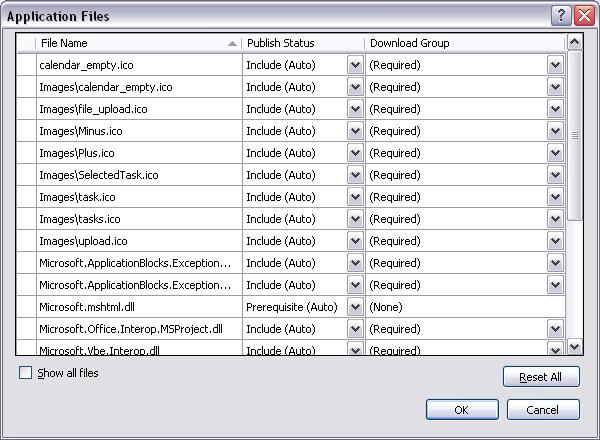
Clickonce correctly identifies Microsoft.mshtml.dll as a prerequisite but has marked "None" as the dowload group i.e. it does not get downloaded to the user's machine. To enable it going in to the user's machine, you can just mark the Publish Status of the dll to "Include (Auto)" . You will see the download group automatically being changed to "(Required)". Now publish it.
Clickonce will now identify the dll as a required download dll so will download it to the user's workstation. While installation, the Interop dll's will find Microsoft.mshtml.dll in their current directory hence will no longer look in to GAC for the dll and the install will go on smoothly.
And this is a cheaper a better solution too.
I was surprise at first as I was not at all using Microsoft.mshtml in my application. As it turned out, the PIA's refer to this dll internally. As I have Visual Studion installed in my workstation, the Microsoft.mshtml had got added to my GAC and the appliaction worked fine on my workstation. People who have not installed Visual Studio or .NET Framework SDK dont have it in there GAC hence the error. Now that I found the problem, I had to find a solution.
Tried to force users to install .NET Framework SDK by setting it as Prerequisite in ClickOnce (under Publish -> PreRequisite) solved the issue but it does not make much sense to ask users to download a 350+ MB package and install it just to get a dll. There has to be a easy way out.
So I started thinking of alternatives. Any application looks for dlls in GAC only after it has looked in to the current directory. The solution was to push Microsoft.mshtml.dll in to the bin directory.
By default if you go to Project Properties -> Publish -> Application Files you will see something like :
Clickonce correctly identifies Microsoft.mshtml.dll as a prerequisite but has marked "None" as the dowload group i.e. it does not get downloaded to the user's machine. To enable it going in to the user's machine, you can just mark the Publish Status of the dll to "Include (Auto)" . You will see the download group automatically being changed to "(Required)". Now publish it.
Clickonce will now identify the dll as a required download dll so will download it to the user's workstation. While installation, the Interop dll's will find Microsoft.mshtml.dll in their current directory hence will no longer look in to GAC for the dll and the install will go on smoothly.
And this is a cheaper a better solution too.
Saturday, August 1, 2009
USB Mass Storage Issues - v2
In an earlier post USB Mass Storage Issues I talked about uninstalling MS Windows drivers and installing Intel drivers.
Today I found the issues again and found that my drives are too old. To check for your drivers check the Intel site : http://www.intel.com/support/graphics/detect.htm . Please get the latest Intel drivers and install them. Post install you should have the latest chipset drivers and you USB should be working fine.
P.S: Ealier I preferred Intel over MS drivers. Therafter I read more documentation at the Intel site and found that Intel is supporting USB driver updates from Windows update site. So for latest drivers you can get it from MS Windows update site too. Still check for the latest updates at the Intel site too.
Today I found the issues again and found that my drives are too old. To check for your drivers check the Intel site : http://www.intel.com/support/graphics/detect.htm . Please get the latest Intel drivers and install them. Post install you should have the latest chipset drivers and you USB should be working fine.
P.S: Ealier I preferred Intel over MS drivers. Therafter I read more documentation at the Intel site and found that Intel is supporting USB driver updates from Windows update site. So for latest drivers you can get it from MS Windows update site too. Still check for the latest updates at the Intel site too.
Subscribe to:
Posts (Atom)